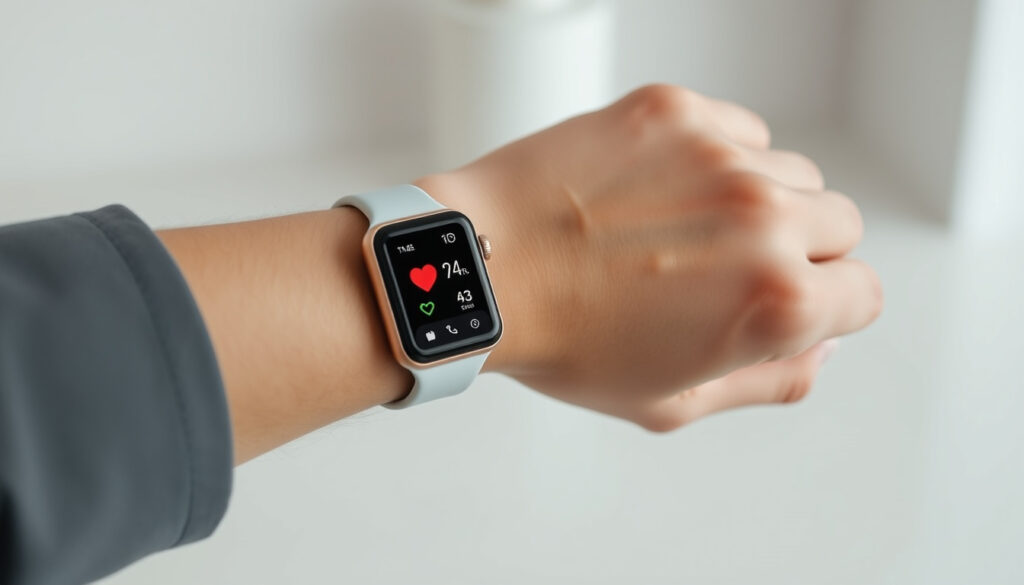
Apple Watch Blood Pressure: What It Can (and Can’t) Do in 2025
You probably bought an Apple Watch thinking it could keep tabs on everything, including blood pressure. It turns out the truth is more nuanced—and more interesting. This guide walks through what the watch actually does (hypertension notifications, not cuff-style readings), which models have it, and where the technology is heading.
Current Apple Watch BP feature: Hypertension notifications only – not a direct measurement ·
Compatible models: Apple Watch Series 10, Ultra 2 (watchOS 11.1+) ·
How it works: Passive monitoring over 30 days using optical heart sensor (photoplethysmography) ·
Regulatory status: Not FDA-cleared for blood pressure measurement
Quick snapshot
- Hypertension notifications (passive) (Apple Support)
- Available on Series 10 and Ultra 2 (Apple Support)
- Requires watchOS 11.1 (Apple Support)
- Optical heart sensor measures blood volume changes (Apple Newsroom Canada)
- 30-day algorithm detects chronic high BP patterns (Apple Newsroom Canada)
- No real-time readings (Apple Support)
- Rumored direct BP sensor for Ultra 3 and Series 11 (CNET)
- Patent filings indicate cuffless technology (CNET)
- No official release date (CNET)
Five key facts about the feature, one pattern: Apple has built a screening tool, not a replacement for your doctor’s cuff.
Here are the essential specifications for Apple’s current hypertension detection system:
| Fact | Value |
|---|---|
| Feature name | Hypertension Notifications |
| Availability | watchOS 11.1+ on Apple Watch Series 10 and Ultra 2 |
| Measurement type | Passive monitoring over 30 days |
| Sensor used | Optical heart sensor (photoplethysmography) |
| Regulatory clearance | Not FDA-cleared for blood pressure measurement |
| Eligibility | 22+, non-pregnant, no prior hypertension diagnosis |
| Setup location | Health app on iPhone (Health Checklist) |
| Regional rollout | Canada (Oct 2025), India (Dec 2025), more countries pending |
The takeaway: Apple is positioning notifications as a lifestyle screening tool, not a medical diagnostic.
Can the Apple Watch measure blood pressure?
Short answer: No, not in the way you probably imagine. The Apple Watch does not take a systolic/diastolic reading like a cuff. Instead, the Hypertension Notifications feature uses the optical heart sensor to analyze how blood vessels respond to heartbeats over 30 days. If the algorithm detects patterns consistent with chronic high blood pressure, it sends you a notification (Apple Support).
What the hypertension notifications feature does
- Passively monitors photoplethysmography (PPG) signals from the optical heart sensor (Apple Newsroom (Canada))
- Looks for trends over a rolling 30-day window (Apple Support)
- Sends a notification only when consistent signs of hypertension are found (Apple Support)
Why it is not a blood pressure cuff replacement
Apple is explicit: the feature is not a medical device and should not replace regular cuff measurements (Apple Newsroom (India)). The watch gives you a heads-up, not a diagnosis.
For someone who has never been diagnosed with hypertension, a notification is a useful early signal. But you still need a cuff to confirm the numbers.
The implication: Think of it as a smoke alarm that points you toward a real test, not as the fire department itself.
Which Apple Watch models support hypertension notifications?
Apple has kept the feature to the newest devices. The eligible models are Apple Watch Series 9 or later and Apple Watch Ultra 2 or later per official Apple Support documentation.
Model compatibility list
- Apple Watch Series 9 (Apple Support)
- Apple Watch Series 10 (Apple Support)
- Apple Watch Ultra 2 (Apple Support)
watchOS requirements
- watchOS 11.1 or later (Apple Support)
- Paired iPhone with iOS 18 or later (Apple Support)
The pattern: Apple is keeping the feature exclusive to the latest silicon (S9 and newer), so older Series 6–8 users miss out.
How does Apple Watch blood pressure monitoring work?
The technology behind the scenes is photoplethysmography (PPG). The green LEDs and photodiodes on the back of the watch measure blood volume changes in your wrist. Over a month, the algorithm learns your baseline and flags deviations.
Photoplethysmography (PPG) signals
- The optical heart sensor flashes green light hundreds of times per second (Apple Newsroom (Canada))
- It detects the pulse wave as blood flows through the microvasculature (Apple Support)
- The feature does not measure systolic or diastolic pressure directly (Apple Support)
30-day analysis window
Wrist detection must be on, and you need to wear the watch consistently. The algorithm needs enough nighttime data to establish a reliable trend (Apple Support).
Because it relies on long-term patterns, you won’t get an alert simply from one stressful day. That reduces false positives but also means the feature can’t warn you about a sudden spike.
The trade-off: You trade real-time awareness for trend reliability.
How accurate are Apple Watch hypertension alerts?
Accuracy is the big question. The FDA cleared the feature in September 2025 (CNET), but clearance is not the same as approval for diagnostic use. Apple says the feature is not intended for people who already have a hypertension diagnosis (Apple Newsroom (India)).
Clinical study evidence
Research reported in the journal Hypertension found that the probabilistic screening approach had moderate sensitivity—useful for flagging potential hypertension but not for confirming it (CNET).
Limitations for individuals
- Not validated for people under 22 or during pregnancy (Apple Newsroom (Canada))
- Not a substitute for periodic cuff measurements (Apple Support)
The Apple Watch does not actually measure BP, but instead it analyzes photoplethysmography signals over 30 days and provides a probabilistic estimate of hypertension.
— Study authors in Hypertension (AHA), as reported by CNET
The implication: If you get a notification, treat it as a nudge to measure with a proper cuff, not as a diagnosis.
How to check blood pressure or enable hypertension alerts on your Apple Watch
Setting up the feature in Health app
- Open the Health app on your iPhone.
- Tap your profile picture, then select Health Checklist.
- Find “Hypertension Notifications” and turn it on (Apple Support).
- You must be 22 or older, not pregnant, and not previously diagnosed with hypertension (Apple Newsroom (Canada)).
Interpreting notifications
- If you receive a notification, it means the watch detected consistent signs of possible hypertension.
- Apple recommends confirming with a traditional blood pressure cuff (CNET).
- You can also manually log blood pressure readings in the Health app under “Blood Pressure”.
The feature requires nighttime wear to collect enough data. If you charge your watch overnight, you’ll miss the most valuable sleep-time recordings.
The catch: The setup is simple, but the real work is wearing the watch consistently for weeks.
Will future Apple Watches (Ultra 3, Series 11) have direct blood pressure measurement?
Rumors have been swirling since late 2023. Reports from multiple outlets suggest Apple is working on a true blood pressure sensor that would give spot readings, not just trend alerts. But nothing is confirmed.
Current rumors and patents
- Apple has filed patents for cuffless blood pressure sensing using optical and force-based methods (CNET).
- Analysts predict the feature could debut in Apple Watch Ultra 3, possibly in 2026 (CNET).
- Apple has not commented publicly on any timeline.
Expected timeline
- 2026 (rumored): Apple Watch Ultra 3 with direct BP measurement
- 2027 (rumored): Apple Watch Series 11 with direct BP measurement
The pattern: Each generation of Apple Watch has added a major health sensor. Blood pressure feels like the next frontier, but the engineering hurdles are steep.
Timeline
Here is how the feature has rolled out so far and what analysts expect next:
| Date | Event |
|---|---|
| September 2024 | Apple Watch Series 10 and Ultra 2 launched with watchOS 11 |
| September 2025 | FDA clears Apple’s hypertension detection feature (CNET) |
| October 2025 | Hypertension notifications roll out in Canada (Apple Newsroom Canada) |
| December 2025 | Hypertension notifications roll out in India (Apple Newsroom India) |
| 2026 (rumored) | Possible release of Apple Watch Ultra 3 with blood pressure sensor |
| 2027 (rumored) | Potential Apple Watch Series 11 with direct BP measurement |
The implication: The timeline shows a pattern of careful regulatory rollout, not a sudden leap.
Confirmed facts and what’s unclear
Confirmed facts
- Hypertension notifications are available on Apple Watch Series 9, Series 10, and Ultra 2 (Apple Support).
- Feature uses optical heart sensor data over 30 days (Apple Newsroom Canada).
- Apple does not claim the feature provides medical-grade blood pressure readings (Apple Support).
- Feature is available in Canada and India, with more countries pending (CNET).
What’s unclear
- Exact accuracy of the feature across diverse populations (CNET).
- Timeline for direct blood pressure sensor in future models.
- Whether Apple will seek FDA clearance for a future BP monitoring feature.
The Hypertension Notifications Feature can look for patterns of chronic high blood pressure and notify you of possible hypertension.
— Apple Support documentation
For someone shopping for an Apple Watch primarily to monitor blood pressure, the decision is clear: the current feature is a screening tool, not a replacement for a cuff. The future models may change that, but for now, buy the watch for its other health features and treat the hypertension notifications as a bonus—one that still requires a follow-up with your doctor.
chicagodpc.com, dailymotion.com, apple.com, empirical.health, appleinsider.com, reddit.com, reddit.com, youtube.com, instagram.com
If you’re curious about how the Apple Watch detects potential hypertension, the Apple Watch hypertension alerts guide offers a thorough breakdown.
Frequently asked questions
What is hypertension and why does it matter?
Hypertension, or chronic high blood pressure, forces the heart to work harder and increases the risk of heart disease, stroke, and kidney damage. It often has no symptoms, which is why screening tools are valuable.
Can I use my Apple Watch instead of a traditional blood pressure cuff?
No. Apple explicitly warns that the hypertension notifications feature is not a medical device and should not replace regular cuff measurements.
Do I need to wear my Apple Watch to bed for the hypertension feature?
Not strictly, but nighttime data helps the algorithm establish a reliable baseline. If you charge overnight, you may reduce the feature’s effectiveness.
Does the hypertension notifications feature work on older Apple Watch models?
No. It requires Apple Watch Series 9 or later, or Apple Watch Ultra 2, with watchOS 11.1 or later.
Will Apple Watch ever replace traditional blood pressure monitors?
Rumors point toward a future direct blood pressure sensor, but Apple has not confirmed any timeline. For now, traditional monitors remain essential.
How should I interpret a hypertension notification on my Apple Watch?
Treat it as a prompt to measure your blood pressure with a traditional cuff. If you get multiple notifications, consult your doctor.
Is 140/90 blood pressure considered dangerous?
A reading of 140/90 mm Hg is stage 2 hypertension according to AHA guidelines and warrants medical attention. It should be confirmed with multiple readings.
How can I manually log blood pressure in the Apple Health app?
Open the Health app, tap Browse, search for “Blood Pressure,” and tap Add Data. You can enter systolic, diastolic, and date.
Related reading
More related posts
 What Time Does Dollar Tree Close – Hours by Day, Location & Holidays
 CeraVe vs The Ordinary: Which Skincare Brand Is Better for Gen Z
 Whataburger 75 Cent Burgers on Aug 8: How to Claim
 Sophia Lillis Movies and TV Shows: Full List
 Cast of the Substance – Actors, Roles and Production Insights
 When to Worry About Blood in Stool: A Quick Guide
 RCB vs CSK Timeline: Head-to-Head, Young Stars, Ban History
 Leave the World Behind (Film) – Plot, Cast & Ending Explained